Pregnancy-aware
Tailor guidance to pregnancy mode and trimester context.
 Scanary
Get Scanary
Scanary
Get Scanary
Scan any ingredient label and get clear, parent-friendly guidance for pregnancy, babies, toddlers, allergies and preferences.
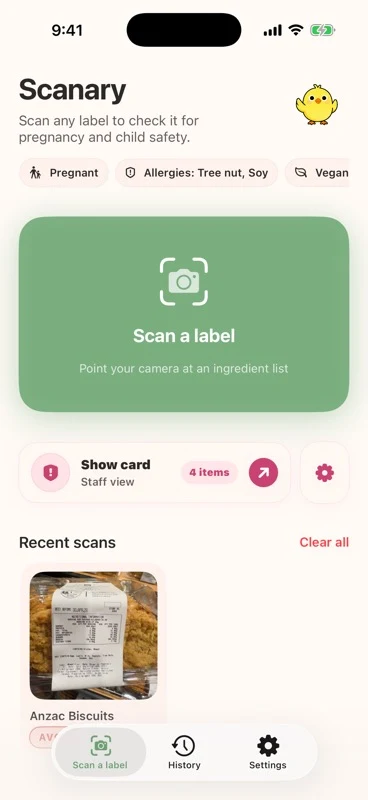

Scanary turns dense ingredient labels into simple next steps while keeping your profile, scan history and preferences on your device.
Tailor guidance to pregnancy mode and trimester context.
Check age-aware concerns like choking risks, caffeine and added sugar.
Track allergens and lifestyle choices in one quick scan flow.
Keep a multilingual allergy card ready for staff when you eat out.
The same label can raise different questions depending on who is eating. Scanary keeps that context close without making the app feel clinical.
Use pregnancy mode to review ingredients with the context you set during onboarding.
Review age-aware concerns before handing over a new snack, pouch or packaged food.
Keep allergens and lifestyle preferences visible when labels are long or unfamiliar.
Open the camera, point at an ingredient list and review the result in plain language before you decide.
Use the camera or a saved photo when packaging is hard to read.
See safe, limit and avoid items grouped by what matters to your family.
Keep scans locally and share allergy details when you need them.
Results are grouped into safe, limit and avoid-style guidance so the scan is easy to skim.
Pregnancy, child age, allergies and preferences can shape what Scanary highlights.
Keep a staff-friendly allergy card ready for restaurants, cafes and family meals.
Scanary does not require accounts. The app is built around local device storage, anonymous device authentication and a clear public privacy policy.
Short answers for App Store reviewers, early users and parents checking whether Scanary fits their routine.
No. Scanary provides general food-label guidance and is not a substitute for a doctor, midwife, paediatrician, dietitian or allergy specialist.
No. Scanary uses device-based authentication and stores most app data locally on your iPhone.
Use the camera or a saved photo for ingredient labels on packaged food and drinks. Clear lighting and a readable label improve results.
Yes, you can track allergens and preferences, then keep a multilingual allergy card ready to show staff. Always confirm important details with packaging and staff.
Get support, ask about the app, or review the public legal pages before using Scanary.